Java Scanner Hasnext String Example
This article will feature a comprehensive Example on Java Scanner hasNext method. We will also understand the hasNext method of Iterator interface with suitable example.
1. Introduction
In Java, Scanner is a simple text reader which can parse primitive types and strings using regular expressions. It has been added to JDK 1.5. It breaks its input into tokens using a delimiter pattern which by default matches whitespace. The resulting tokens may then be converted into values of different types using the various next methods.
2. Java.util.Scanner.hasNext()
java.util.Scanner class provides a method hasNext to check if an input token is present and it returns true if this scanner has another token in its input. This method may block while waiting for input to scan and the scanner does not advance past any input.
Below code demonstrates a simple example with Scanner hasNext method.
ScannerHasNextExample
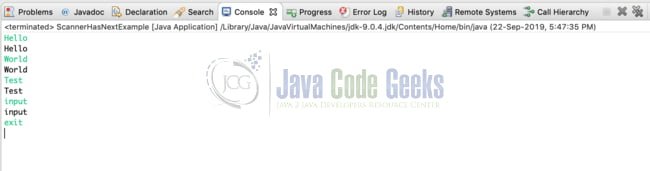
public class ScannerHasNextExample { public static void main(String[] args) { Scanner sc = new Scanner(System.in); // Scanner is instantiated with System.in String input = null; while(sc.hasNext() && !(input = sc.next()).equals("exit")) { System.out.println(input); } sc.close(); // Scanner is closed } } In the above example, the scanner is instantiated to read user input. Inside the while loop, hasNext() method blocks the main thread until an input token from console is available and prints the token. The program prints the input tokens until the string 'exit' is entered. The above example prints an output like below after execution.
Scanner also allows us to define custom delimiter using the useDelimiter method. When a custom delimiter is defined for Scanner, it splits input tokens based on the delimiter defined and this is explained as part of the below example. ScannerHasNextWithDelimiterExample
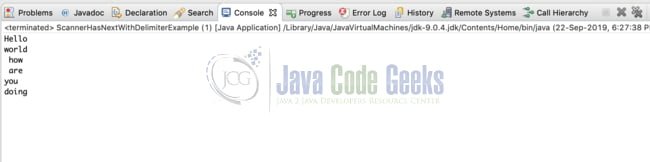
public class ScannerHasNextWithDelimiterExample { public static void main(String[] args) { Scanner sc = new Scanner("Heelo.world. how . are.you.doing"); sc.useDelimiter("\\."); // Custom delimiter dot is defined while(sc.hasNext()) { System.out.println(sc.next()); // Printing the input token scanned } sc.close(); // Scanner is closed } } In the above example, dot is defined as the delimiter for the Scanner which is instantiated with a String source. It splits the input using the defined delimiter dot. When it is looped over hasNext method to check for input, the split input tokens are printed in the console like below
3. Java.util.Iterator.hasNext()
Java provides Iterator interface to iterate over elements of a collection. java.util.Iterator should be preferred over java.util.Enumeration for iteration in the Java Collections Framework. It differs from enumeration in two ways like stated below
- Iterator allows the caller to remove elements from the underlying collection during the iteration using remove() method.
- Method names in Iterator have been improved.
Iterator interface provides hasNext method which returnstrue if the backing collection has more elements.
Below is an example to understand how hasNext method is used for iterating over a collection. JavaIteratorHasNextExample
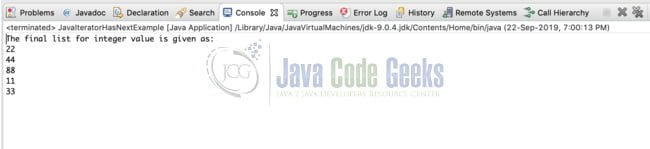
public class JavaIteratorHasNextExample { public static void main(String[] args) { List li = new ArrayList(); // ArrayList is instantiated li.add(22); li.add(44); li.add(88); li.add(11); li.add(33); Iterator itr = li.listIterator(); // List iterator instance is obtained System.out.println("The final list for integer value is given as: "); while(itr.hasNext()){ System.out.println(itr.next()); } } } In the above example, ListIterator which implements the iterator interface is obtained for an ArrayList of Integers. Inside the while loop, the iterator is checked for an element being present using its hasNext method and the element is printed.
The above code when executed produces an output like below.
4. Summary
In the article, we have understood the characteristics of Scanner's hasNext method and how to use it to check for input tokens with examples. Also, we have understood what an iterator interface is and how its hasNext method can be used for iterating over collections
5. More articles
- java.util.Scanner – Scanner Java Example (with video)
- ArrayList Java Example – How to use ArrayList (with video)
- Hashmap Java Example (with video)
- Java Array – java.util.Arrays Example (with Video)
- Java List Example
- Java Queue Example (with video)
- Java Stack Example (with video)
- LinkedList Java Example (with video)
- Hashset Java Example
6. Download the Source Code
This source contains the example code snippets used in this article to illustrate the Scanner hasNext and Iterator hasNext methods.
Last updated on Jul. 28th, 2021
Source: https://examples.javacodegeeks.com/scanner-hasnext-java-example/
0 Response to "Java Scanner Hasnext String Example"
Post a Comment